Task Manager
Listub is a to do list app free to use for as long as you like, built for the jobs that pile up between work, the flat and the family. Write a task, break it into subtasks, give it a date and a reminder, and watch the list shrink instead of scrolling past it in a note app you stopped opening months ago.
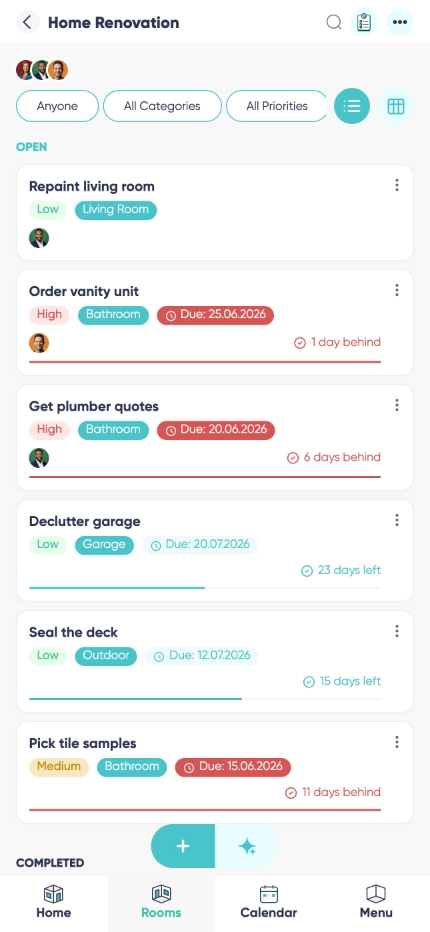

Subtasks and progress at a glance
A task list app with subtasks turns "sort out the move" into six things you can actually tick off. The card shows how far along you are, so nothing sits at 90 percent forever.

The task app with reminders you set once
Give a task a due date and a reminder and it comes back to you at the right moment. Repeating jobs - the bins, the invoice, the filter change - come back on their own schedule.

One shared to do list for everyone involved
Hand a task to your partner, your flatmate or a colleague, add a note about what you already tried, and everyone sees the same state without a single status message.

Statuses that match your process

Smart alerts
Why choose Listub Task Manager?
Most people run their week out of a note, a calendar and a memory that lets them down. Listub replaces that with one task manager app: due dates, subtasks, statuses, reminders and shared assignments, in a design that opens fast and gets out of the way.
Personal and shared work live side by side. Keep your own list to yourself, use a room with the people a job actually involves, and switch between the two without exporting anything or starting a second app.
It is built for speed and reliability. Everything works without a signal, edits queue locally, and the moment you are back online your changes are exactly where everyone expects them.
Families
A to do list app for family life: chores, homework, the paperwork nobody wants. Assign it, date it, and stop being the only person who remembers.
Small teams
Coordinate a handful of people without a project tool. Owners, dates, notes and a status everyone can read in two seconds.
Personal projects
Break a big goal into steps, tick the steps off, and keep the whole thing in one place instead of across three half-finished lists.
Frequently asked questions
Is there a to do list app for Android?
Yes. Listub runs on Android phones and tablets, and every task, subtask and reminder stays in sync with your other devices.
Is there a version for iPhone?
Yes, on iPhone and iPad, plus the web. Add a task on the phone and finish planning it on a laptop.
Can I use it as a daily planner app?
Yes, for everything task-shaped: dated jobs, reminders and repeats give you a clear day. If you also want events and outings on a calendar, that is the Activity Planner module.
Is Task Manager free?
Yes. Tasks, subtasks, due dates, reminders and custom statuses are all on the free plan, and Premium is only about inviting other people into your own rooms.
Does it work offline?
Yes. Add and edit tasks with no signal at all; the changes queue on the device and sync automatically as soon as you reconnect.
Can I customize statuses?
Yes. Create or rename states to mirror how the work really moves, from a simple open and done pair to a full board.
Can I share my rooms with family or friends?
Sharing your own rooms is a Premium feature. On the free plan your rooms are yours alone, on your own device, and you can't invite anyone into them - but you can always join a room that a Premium member shares with you and use it fully.
Add it by just asking
No forms, no menus. Tell Listub AI what you want and it lands here, ready to go.
Try saying…