Emergency Contacts
A medical information app free of clutter and guesswork: the doctor, the specialist, the pharmacy, the insurance line, the school office, the neighbour with the spare key - each with the numbers, addresses, policy identifiers and notes you would otherwise be hunting for in old emails. Listub does not call anyone and does not contact emergency services. It keeps what you wrote down where a person can find it.
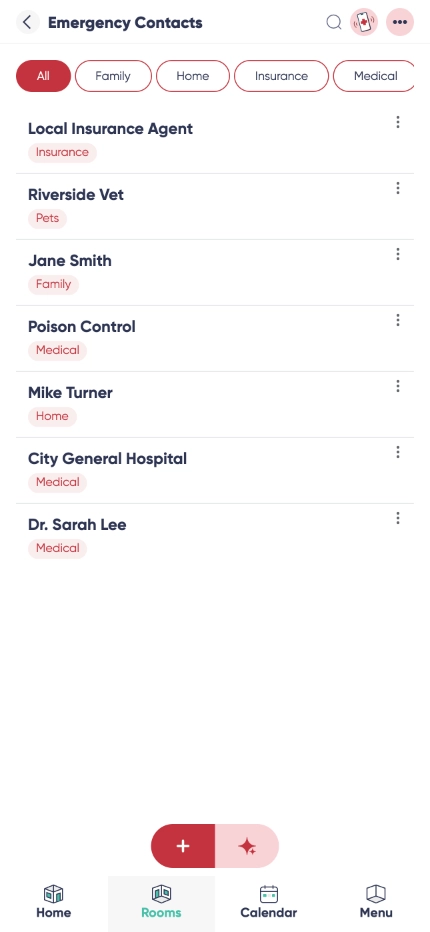

Every detail on the contact itself
An app to store emergency contacts offline is worth more than a note in the cloud when the signal drops. Names, roles, relation, phone numbers, emails, addresses, policy identifiers and free notes are saved on the device and readable there.

An ICE contacts app that stays sorted
Group them the way you actually look for them: medical, family, utilities, school, neighbours, local services. Filtering beats scrolling when your hands are shaking.

Share with the people who need it
Give the babysitter, your partner or the person minding your parents the same list, without forwarding numbers one by one or handing over your whole address book.

Easy access

Detailed information
Why use Emergency Contacts?
An emergency information app earns its place on the day nothing else works. The numbers are already there, already labelled, already with the policy line and the note about which entrance to use - so whoever is holding the phone can read it out instead of searching for it.
It suits households, elderly care between siblings, babysitters, pet sitters and travelling: one private, reliable place for the phone number, the policy or the instruction. Listub stores and shows. Calling, and deciding who to call, stays with you.
Households
As a family emergency contacts app it holds the doctor, the relatives, the school office, the pharmacy and the plumber in one room everyone at home can open.
Kids and carers
Building an emergency contact list for kids - for the school form, the babysitter or a first phone - means writing the same names out again every year. Keep it once, share it with whoever is looking after them, update it in one place.
Travelling
Embassy, travel insurance, roadside assistance, the clinic your policy actually covers. Saved before you leave, readable when the roaming is not.
Frequently asked questions
Is there a version for Android?
Yes. Listub runs on Android phones and tablets, and the list you build there is the same one everyone in the room sees.
Is there a version for iPhone?
Yes, on iPhone and iPad, plus the web. Type the long entries in on a laptop and read them on the phone.
Can it show contacts on my lock screen?
No, and we would rather say so plainly: Listub is not an app for emergency contacts on lock screen. Your phone has its own emergency card in the system settings, and that is the one paramedics are trained to look for - set it up there. Listub is the fuller record behind it, for you and the people you share it with.
Does Listub call anyone or alert emergency services?
No. It never dials, never notifies anyone and is not a medical alert device. In an emergency you call the emergency number for your country. Listub only makes the other numbers quick to find.
Does it work offline?
Yes. Entries you have opened stay readable when the connection drops, so the numbers and notes are still there. Edits sync automatically once you are back online.
How secure is the information I store?
Data is encrypted in transit and at rest. Access is limited to your account and to the people you explicitly invite, and you can withdraw that access at any time without exposing anything else.
How much does it cost?
Nothing to start. Contacts, categories, notes and search are all on the free plan, and you only look at Premium once you want to invite other people into your own rooms.
Can I share my rooms with family or friends?
Sharing your own rooms is a Premium feature. On the free plan your rooms are yours alone, on your own device, and you can't invite anyone into them - but you can always join a room that a Premium member shares with you and use it fully.
Add it by just asking
No forms, no menus. Tell Listub AI what you want and it lands here, ready to go.
Try saying…