Subscription Central
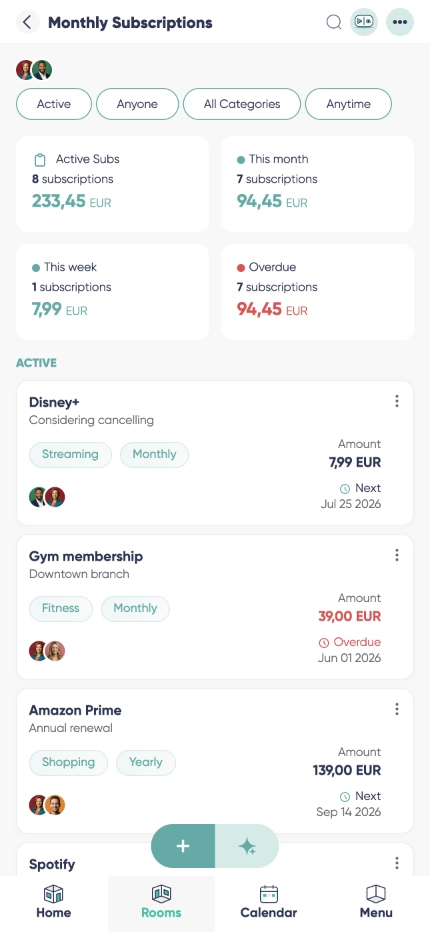
A subscription tracker free of monthly fees of its own, for the streaming, software, utility and household services that quietly leave your account every month. Write each one down once and you get the real total, the next renewal date, who in the house actually uses it, and a reminder before a trial converts. Nothing is linked to your bank - you enter what you pay, and Listub keeps the picture straight.

Personalized currency
A recurring payments tracker is useless if it rounds your money into one currency. Each service keeps the currency it is actually billed in, exactly as you set it in the room.

Organize by categories
If you came looking for a track subscriptions app, this is the screen you wanted: media, utilities, productivity, education, storage and insurance grouped so you can see where the money is really going.

Assign participants
Note who pays and who actually uses it. Two people paying for the same streaming service is the single most common thing this module catches.

Billing timeline

Privacy control
Why manage subscriptions with Listub?
Most people underestimate their recurring spend by a wide margin. Used as a subscription manager app, Listub gives you the honest number in one screen, which is usually enough on its own to make you drop two or three services you had forgotten you were paying for.
Households and small teams finally see who pays for what: no duplicate signups, no overlapping tools, and the private items stay private. What you see is what you entered - Listub does not connect to a bank account and does not give financial advice.
It is also the free trial reminder app you meant to set up. Note the day the trial ends when you sign up, and a reminder arrives while cancelling is still your decision rather than a refund request.
Households
TV, internet, cloud storage, insurance and the utilities in one list, so the whole house can see what the fixed monthly cost really is.
Freelancers
Software seats, design assets and annual licences with their renewal dates, ready for the moment your accountant asks what the tools cost this year.
Families
Music, video and learning platforms with the payer noted, so the three half-used accounts for the same service become one.
Frequently asked questions
Is there a subscription tracker app for Android?
Yes. Listub runs on Android phones and tablets, and your renewals and reminders stay with you across devices.
Does it work on iPhone and iPad?
Yes, on iPhone and iPad too, plus the web. Add a service on the phone the moment you sign up and review the totals later on a bigger screen.
Is this a cancel subscriptions app?
No, and it does not pretend to be. Listub shows you what you are paying and reminds you before the next charge; the cancelling happens with the provider, by you. Nobody here takes a cut of what you save.
Is there an app to see all my subscriptions in one place?
That is exactly what this module is. Enter each service once with its price and cycle, and you get one list, one monthly total and one yearly total.
Will I get renewal reminders?
Yes. Set a reminder ahead of the billing date and you get the nudge with time to decide, instead of finding the charge on a statement.
Can I hide specific subscriptions?
Yes. Mark an entry private and only the people you allow can see it, while the shared essentials stay visible to the whole room.
Can I share my rooms with family or friends?
Sharing your own rooms is a Premium feature. On the free plan your rooms are yours alone, on your own device, and you can't invite anyone into them - but you can always join a room that a Premium member shares with you and use it fully.
Add it by just asking
No forms, no menus. Tell Listub AI what you want and it lands here, ready to go.
Try saying…