Magnet Notes
Little things get lost inside long documents and buried chat threads. Magnet Notes gives them a board of their own, where each note behaves like a fridge magnet you can drag, recolour and rearrange. It is a sticky notes app free to use for the everyday board, and it stays readable at a glance instead of asking you to open anything.
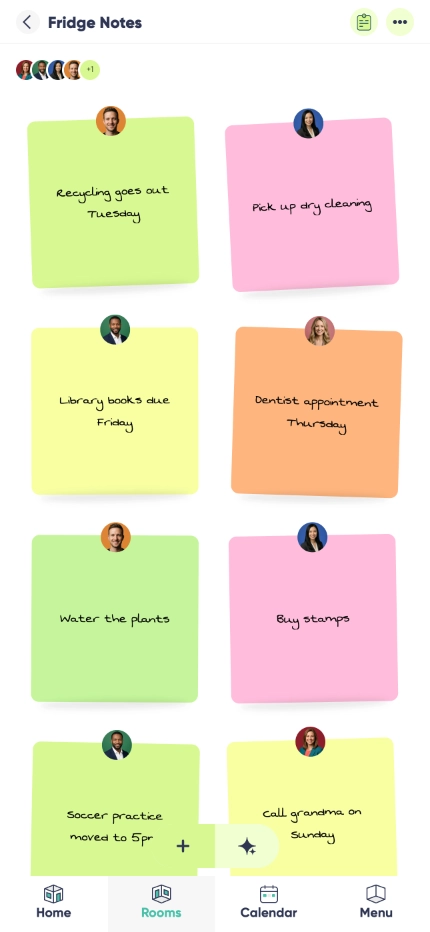

Fridge-magnet feel
A notes board app in the most literal sense. Drag a note where it belongs, push the finished ones to the bottom corner, and let the layout carry meaning the way a real board does.

Always in view
The point of a quick notes app is that you never go looking for it. Everything on the board is visible the moment you open it, so nothing important hides one screen deeper.

Five vibrant colors
Colour-code by urgency, by person or by topic and read the whole board in one glance instead of reading every note.

Handwritten style

Beautiful animations
Why use Magnet Notes?
Paper scraps fall off the fridge and reminder apps go unread. Digital sticky notes solve both: the board is always where you left it, nothing curls up or blows away, and a note you no longer need disappears with one tap instead of accumulating in a list.
It suits households splitting chores, one person keeping their top three in front of them, students holding revision snippets, and anyone catching an idea before it is worth a proper note. Each card stays small on purpose - just enough context to act on, without structuring a thought you have not finished having.
It is an offline sticky notes app first and a synced one second. Write a note on the train with no signal, and it is there when you open the board again - then it syncs privately in the background, so the phone in your pocket and the laptop on the desk show the same board.
Home board
Sticky notes for family fridge duty, without the fridge. Chores, who is picking up whom, the note you would otherwise have left on the kitchen table - all of it on one board everyone can read.
Shopping ideas
A quick note app for shopping ideas that are not a list yet: the brand someone mentioned, a birthday present idea, the thing you keep meaning to replace. Park it on the board and decide later.
Work focus
Keep the two or three things that actually matter today in front of you, and move everything else to the edge of the board until it is their turn.
Frequently asked questions
Is there a sticky notes app for Android?
Yes. Magnet Notes runs on Android phones and tablets, and the board you build there is the board you see everywhere else.
Is there a version for iPhone and iPad?
Yes, and on the web too. Pin a note from the sofa and read it on the laptop.
Is there a sticky notes widget for the home screen?
Not today - Listub does not ship a home screen widget. The board itself is the answer for now: it opens in a tap and everything on it is readable at a glance.
Can I change colors?
Yes. Five distinct colours, so you can group by urgent, waiting, personal and study and scan the board instead of reading it.
Does it sync?
Yes. Sign in and the board syncs privately across your devices. Changes you make without a signal queue up and merge on their own later.
Is it free?
Yes. The board, the colours, the drag layout and offline use are all on the free plan, and you only look at Premium once you want to invite other people into your own rooms.
Can I share my rooms with family or friends?
Sharing your own rooms is a Premium feature. On the free plan your rooms are yours alone, on your own device, and you can't invite anyone into them - but you can always join a room that a Premium member shares with you and use it fully.
Add it by just asking
No forms, no menus. Tell Listub AI what you want and it lands here, ready to go.
Try saying…