Health Cabinet
Health Cabinet is a medicine reminder app free to use from the first day. Write down what you already take - the name, the form, the dosage on the box, the times that suit you - and Listub reminds you when one of those times comes around, records the dose you tick off and warns you before the pack runs out. It keeps your notes, not medical advice.
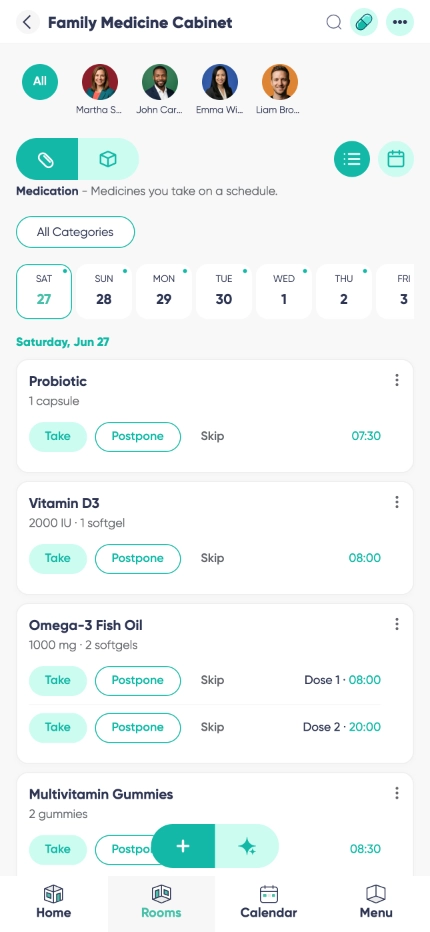

Medications, Vitamins & Supplements
As a medication tracker app it holds exactly what you put in it: every medication, vitamin and supplement with its form, strength, the dosage written on the box and your own notes. One cabinet instead of five boxes and a drawer.

More than a medication list app
A list only sits there. Set daily, weekly or custom times and your phone speaks up at each one, so the evening tablet does not quietly become tomorrow's problem.

Refill Tracking
It doubles as a prescription tracker app: enter how many are left, and Listub tells you the pack is running low while there is still time to reorder or walk to the pharmacy.

Dose Check-off & History

Shared Cabinet
Why choose Listub Health Cabinet?
Most people start with an alarm and a note, then lose track of which alarm was for what. A pill reminder app is simply better at this: the reminder knows which medication it belongs to, the dose you tick gets recorded, and the cabinet tells you what is left. It is a record of what you entered, nothing more - Listub does not give medical advice, suggest dosages or change what your doctor or pharmacist told you.
Built to be fast, reliable and privacy-first, Listub works across platforms and syncs in the background. Your cabinet stays yours, and it is there when you open it.
Daily vitamins
A morning vitamin, a supplement with dinner, a short course that ends on Friday. Set the times once and stop asking yourself at 9pm whether you already took it.
Caring for a parent
Setting up a pill reminder app for elderly parents usually falls to the adult child. Enter their medications and times yourself, keep the screen large and plain, and check the history later instead of phoning to ask.
Households
One family medication tracker for everyone under the roof - the kids' short courses, your own repeats, what the pharmacy still owes you - handled by whoever normally handles it.
Frequently asked questions
Is there a medication reminder Android app?
Yes. Listub runs on Android phones and tablets, and the reminders fire there like any other notification. It is on iPhone, iPad and the web too.
Does it work on iPhone?
Yes, on iPhone and iPad, with the same cabinet on the web if you would rather type the long list in on a laptop.
Does Listub tell me what to take or how much?
No, and it never will. Listub only shows back what you typed in. What to take, how much and when is between you, your doctor and your pharmacist - keep the label and their instructions as the source of truth.
Can I track vitamins and supplements too, not just medications?
Absolutely. Medications, vitamins and supplements sit side by side with the form, the strength and your own notes.
Will it warn me before I run out?
Yes. Enter how many are left and Listub flags the low pack in time to reorder or visit the pharmacy.
Can one person manage the medications for everyone at home?
Yes. Share a cabinet and the person who normally keeps track can enter and update everyone's entries in one place instead of three phones.
Does it work offline?
You can read your cabinet offline, so the names, the times and the notes are always there to check. Adding or editing entries and ticking doses needs a connection - those changes sync the moment you are back online.
How much does it cost?
Nothing to start. Entries, schedules, reminders and the dose history are all on the free plan, and you only look at Premium once you want to invite other people into your own rooms.
Can I share my rooms with family or friends?
Sharing your own rooms is a Premium feature. On the free plan your rooms are yours alone, on your own device, and you can't invite anyone into them - but you can always join a room that a Premium member shares with you and use it fully.
Add it by just asking
No forms, no menus. Tell Listub AI what you want and it lands here, ready to go.
Try saying…